

Set equation sets styles#
Rationale#
SCADE Suite modeler creates all equation sets with the Equation Set default style,
that makes it difficult to identify them. The following diagram has five equation sets,
that can only be identified one by one, with a double-click.
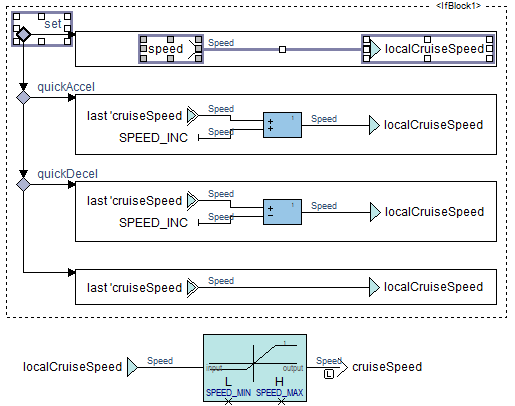
It is possible to associate a different style to each equation set: this is a manual and tedious process.
Description#
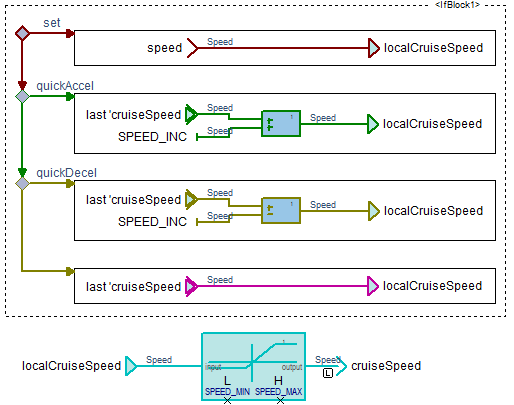
This tool sets different styles to equation sets, so that they are unique within a diagram:
Each equation set is assigned the style
<prefix><count>where<count>starts from 1 and is reset for each diagram,<prefix>is thePREFIXconstant defined at the beginning of the script, the default isEQS.The
<prefix><number>styles are not created.The equation sets are given a default style if the requested one does not exist.
Existing style assignments are not preserved.
For example, the equation sets of the following diagram have been assigned a different style:
Usage#
The script must be run from the IDE:
Load
set_styles.pyinto the IDE.Execute
Tools/Execute scriptcommand.
It is advised to register it in the menu Tools for a faster access,
cf. Tools/Customize... command.
The script is located in %APPDATA%/Python/Python<version>/site_packages/ansys/scade/ps/set_styles
directory when the package is installed with recommended options,
otherwise it is installed in the Python distribution you have selected.
Limitations#
The styles must exist otherwise the script makes old versions of SCADE Suite IDE crash. For example, if a diagram has eight equation sets, the styles
EQS1,EQS2, …,EQS8must exist.