

Rename unused files#
Rationale#
When renaming model elements, SCADE sometimes creates new files. For instance,
if the “Filename” property of an operator is modified, SCADE generates
a new .xscade file with the new name for the operator.
SCADE does not remove obsolete files in such cases. Over time, this means a SCADE model’s directory can become encumbered with obsolete files.
Note
Two IDE settings are useful to limit obsolete file issues:
Tools > Settings > General > Use a creation dialog box: prompts for an element and filename when creating operators and packages.
Tools > Settings > General > Propagate entity name changes to filename: automatically creates a new file, as required, when renaming a model element.
Description#
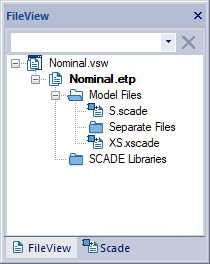
This tool identifies the model files that are not referenced in a SCADE Suite project, for example after renaming an operator or a package.
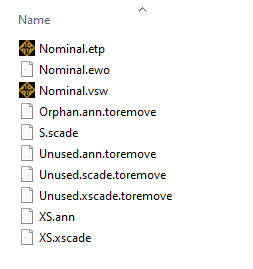
The unused files are renamed with a suffix .toremove. This allows you to
double-check the list of unused files, and then delete them easily from the
command line or the Windows explorer.
This tool considers SCADE model files (XSCADE, SCADE) and annotation files (ANN).
Usage#
usage: ansys_scade_ps_rename_unused [-h] -p <project> [<project> ...]

Ansys SCADE Power Scripts: Rename unused files

options:
  -h, --help            show this help message and exit
  -p <project> [<project> ...], --projects <project> [<project> ...]
                        SCADE Suite projects
For example:
ansys_scade_ps_rename_unused -p Nominal.etp
This command renames the files not referenced by Nominal.etp.
Limitations#
The symbol files are not considered.